Imagine giving an AI agent a simple instruction: “Book me a flight to Mumbai for next Friday, in economy class, under ₹15,000.”
Instead of returning instructions, the agent opens a browser, reads the screen, compares available flights, enters passenger information, selects an option, and completes the task.
There is no custom API integration for every website. No manually scripted sequence for every button. The AI sees what is on the screen, reasons about what it needs to do, takes an action, and checks the result.
This is the idea behind agentic computer vision.
Traditional computer vision could identify objects, classify images, or detect defects. Large language models could understand instructions and generate responses. Agentic AI brings another capability into the picture: autonomous action.
When vision, language reasoning, and action are combined, AI systems can interact with digital interfaces, robots, vehicles, drones, and physical environments.
The AI agents market is projected in the source outline to grow from $5.26 billion in 2024 to $52.62 billion by 2030, while Gartner is cited as predicting that 40% of enterprise applications will embed AI agents by the end of 2026.
So, what exactly is agentic computer vision, and how does it work?
Key Takeaways
- Agentic computer vision combines visual perception, reasoning, and autonomous action.
- AI agents use a continuous See → Understand → Plan → Act → Check loop.
- VLMs primarily understand visual information, while VLAs connect visual understanding with actions.
- Screen agents can use vision to interact with graphical interfaces.
- VLA models are enabling increasingly capable robotic and embodied AI systems.
- Drones and autonomous vehicles are important applications of visual navigation.
- Reliability, latency, safety, and human oversight remain major challenges.
What Is an AI Agent?
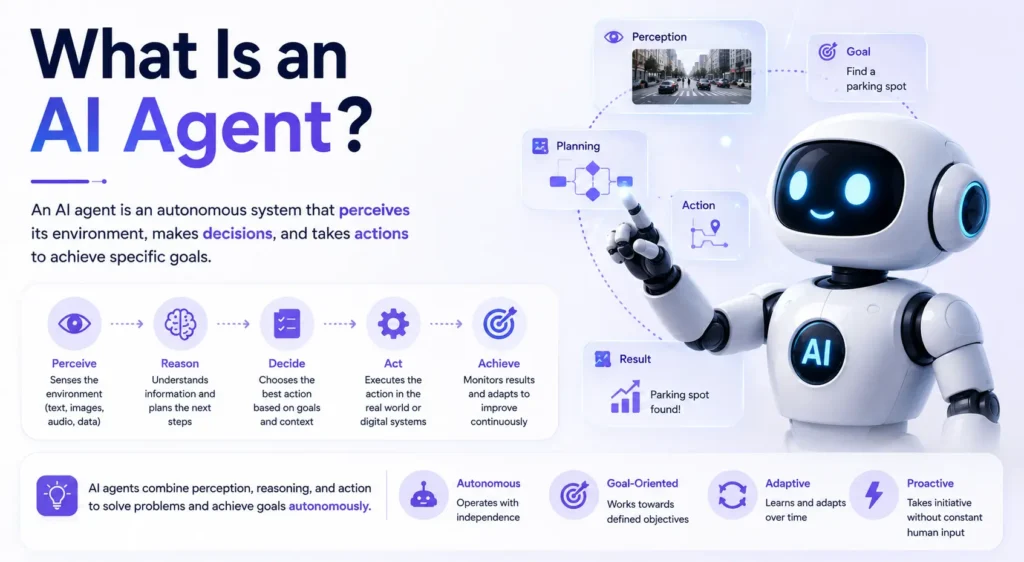
An AI agent is software designed to pursue a goal autonomously. Instead of simply responding to a prompt, an agent follows a continuous cycle:
Perceive → Reason → Act → Check
A traditional chatbot may answer a question such as, “How do I submit this form?”
An AI agent can potentially look at the form, determine which fields need information, enter the required details, click the appropriate controls, and verify whether the submission succeeded.
This difference is important. The agent is not simply generating information. It is using information to make decisions and perform actions.
When computer vision becomes part of this loop, the agent gains the ability to interpret visual environments.
What Is Agentic Computer Vision?
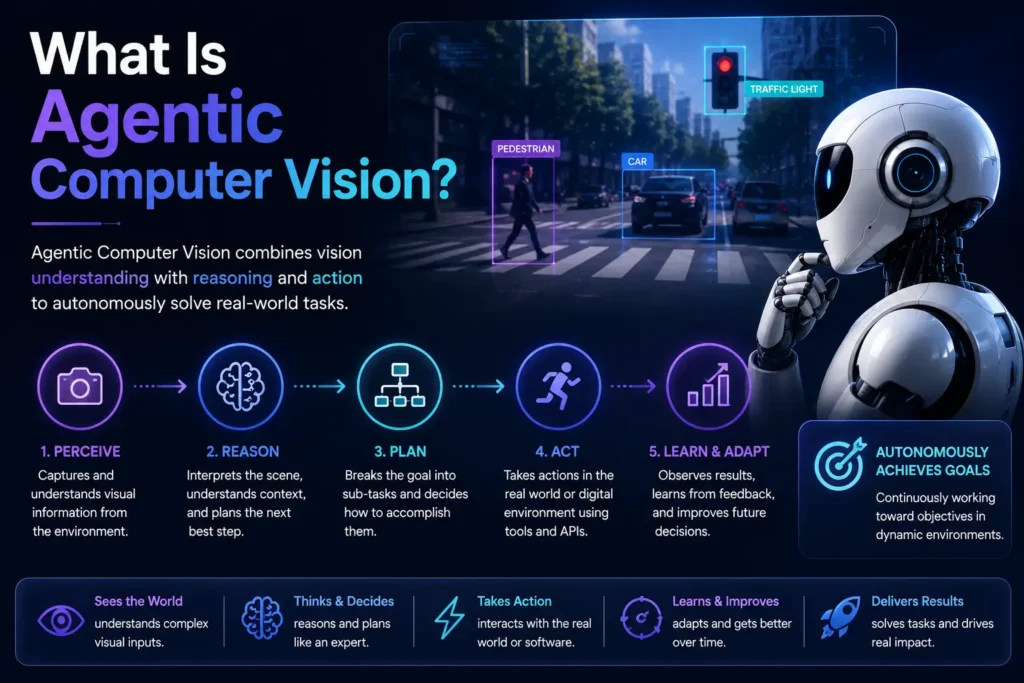
Agentic computer vision combines visual perception with AI reasoning and autonomous action.
Instead of analyzing an image once and returning a classification, an agent continuously observes its environment, interprets what it sees, decides what to do next, performs an action, and observes the result.
For example, a screen agent might see a login page, identify the username and password fields, enter the required information, click “Sign In,” and then inspect the next screen.
A robot can perform a similar loop in the physical world: detect an object, determine how to reach it, move its arm, check the object’s position, and adjust its movement if necessary.
Vision effectively gives AI agents eyes.
How Do AI Agents Use Vision to Navigate?
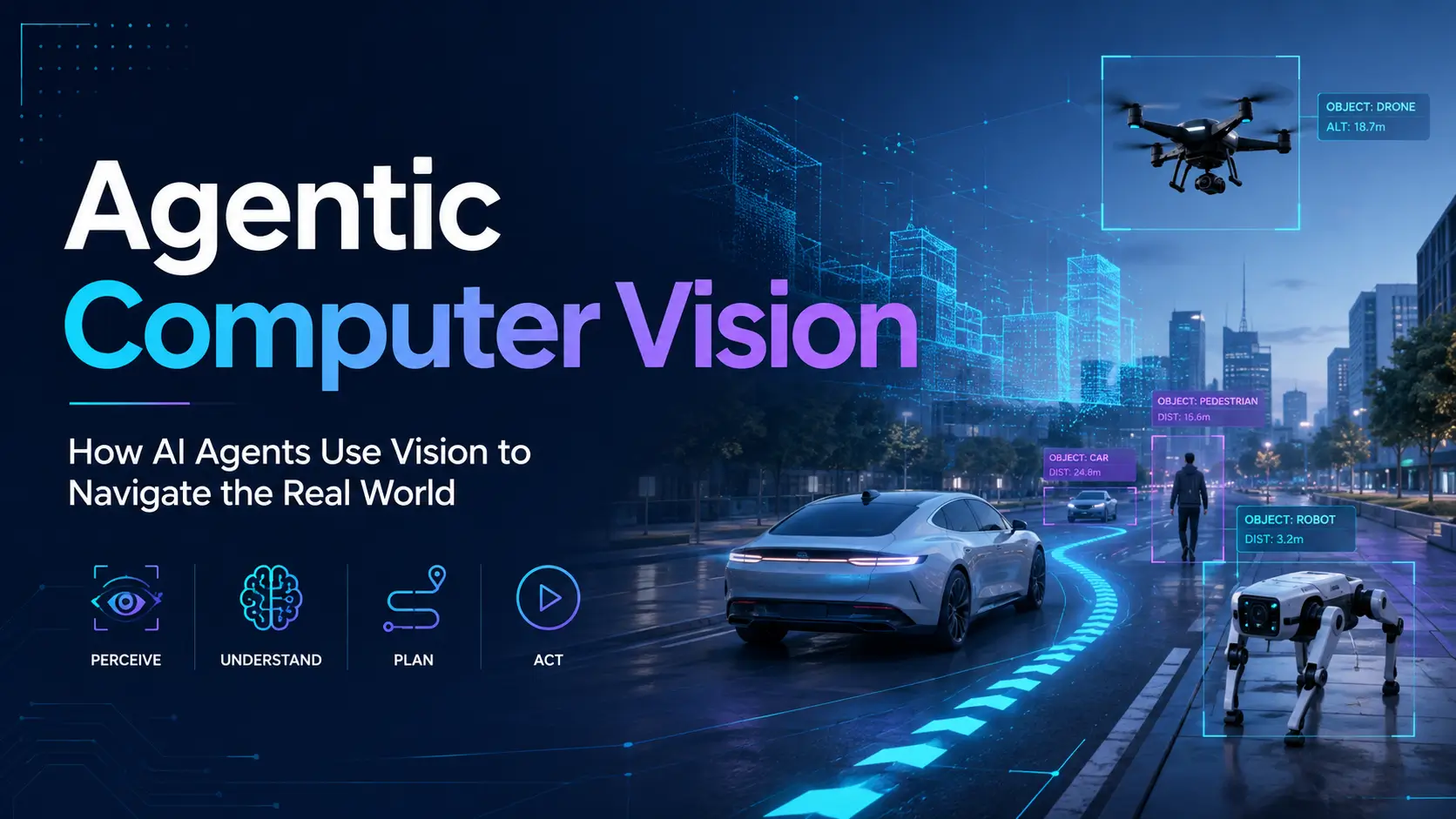
Agentic vision generally follows a five-step perception-action loop:
1. SEE: Capture a Visual Observation
The agent first captures what is in front of it.
This could be a browser screenshot, camera frame, robot sensor input, or drone image. The visual information is processed through a vision encoder or visual backbone.
Think of this as the agent’s eyes taking in a scene before deciding what to do.
Unlike a static computer vision system, an agent can capture multiple observations over time and act between them.
2. UNDERSTAND: Interpret the Scene
The visual information is then interpreted by a Vision-Language Model (VLM).
For example, the model may understand:
“There is a browser window containing a login form with two input fields and a blue Submit button.”
For a robot, it might interpret a scene as:
“There is a red cube on the left side of the table.”
Models such as GPT-4o, LLaVA, Qwen3-VL, and InternVL3 are examples referenced in the source outline for visual understanding.
3. PLAN: Decide What to Do
The reasoning layer combines the visual information with the user’s goal.
For a screen agent, the plan might be:
Click email field → enter email → click password field → enter password → click Submit.
For a robot, the plan could involve moving an arm toward an object, positioning a gripper, picking it up, and moving it somewhere else.
This planning stage is where the system becomes agentic. It is not merely describing what it sees; it is deciding how to achieve a goal.
4. ACT: Execute the Action
The planned action is converted into something the environment can execute.
For a computer, this might mean mouse clicks, keyboard input, or scrolling.
For a robot, it could mean motor commands or movement instructions.
For a drone, actions can involve control signals affecting movement, thrust, and attitude.
5. CHECK: Verify and Repeat
After acting, the agent observes the environment again.
Did the button click work?
Did the robot successfully pick up the object?
Did the drone move to the correct location?
If something went wrong, the agent can reassess and plan another action.
This creates a closed-loop system:
See → Understand → Plan → Act → Check → See again
That closed loop is one of the most important differences between a one-shot AI response and an autonomous visual agent.
VLM vs. VLA: What Is the Difference?
Two terms frequently appear in discussions about agentic computer vision: VLM and VLA.
| Feature | VLM | VLA |
| Full name | Vision-Language Model | Vision-Language-Action Model |
| Main capability | Understands visual content | Understands visual content and produces actions |
| Output | Text, captions, answers | Motor commands, control signals, actions |
| Typical use | Image analysis, VQA, visual reasoning | Robots, drones, autonomous systems |
| Examples | GPT-4o, Gemini, LLaVA, Qwen3-VL | RT-2, π0, GR00T N1, OpenVLA |
A simple way to remember the difference is:
A VLM is like a consultant who tells you what to do. A VLA is like a professional who can actually perform the task.
The source outline identifies VLA models as a major framework for connecting visual understanding directly to physical or digital action.
Screen Agents and GUI Automation
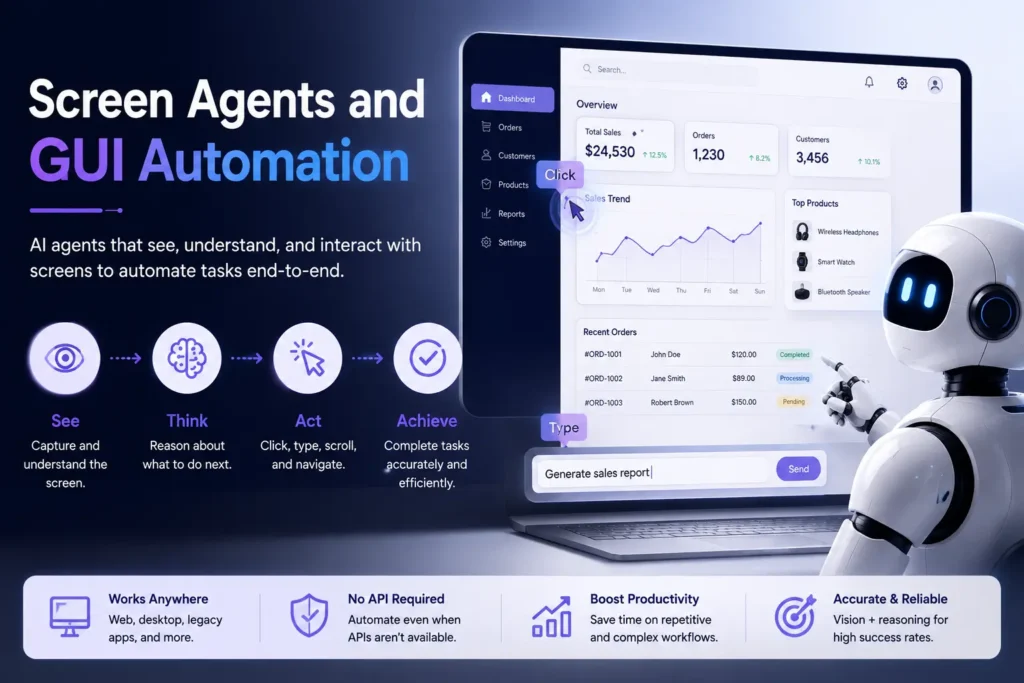
One of the most practical applications of agentic computer vision is computer-use automation.
Instead of requiring a developer to build a separate API integration for every application, a screen agent can interact with software through its visual interface.
The loop looks like this:
Screenshot → Understand UI → Plan → Click/Type → New Screenshot → Repeat
Examples covered in the source include Claude Computer Use, ChatGPT agent mode, Google Project Mariner, and Manus Desktop.
The source comparison cites a 56% web-task success rate for Claude Computer Use and 87% for ChatGPT agent mode in the referenced comparison. These figures should be treated as benchmark/context figures rather than universal measures of real-world reliability.
The important development is that visual agents can potentially interact with software even when traditional APIs are unavailable or difficult to integrate.
That could make them particularly useful for legacy enterprise applications, repetitive administrative workflows, and multi-application tasks.
Embodied AI and Robotics
The same principle becomes even more interesting when AI agents leave the screen and enter the physical world.
Embodied AI refers to intelligence operating through a physical body. A robot does not simply need to understand an image. It needs to translate that understanding into movement.
The source outline highlights several VLA systems and research projects, including π0, NVIDIA GR00T N1, Figure AI Helix, OpenVLA, Qwen-VLA, X-VLA, and LingBot-VLA.
A common architecture can be viewed as two systems working together:
- System 2: A slower reasoning system that understands the environment and determines what should happen next.
- System 1: A faster action controller that translates decisions into physical movements.
This resembles the difference between a strategist and a muscle system. One decides the next move; the other executes it quickly.
Robotic applications include object manipulation, navigation, coordination, and increasingly complex multi-step tasks.
AI Visual Navigation for Drones
Drones create another challenging environment for agentic computer vision.
A drone must continuously interpret its surroundings while controlling movement under strict latency requirements. It needs to coordinate vision with thrust, attitude, and navigation.
Potential applications include:
- Inspection drones
- Search-and-rescue systems
- Delivery drones
- Autonomous aerial navigation
The source outline notes research spanning VLA applications for drones and bimanual robotic systems.
Real-World Applications of Agentic Computer Vision
1. Enterprise Workflow Automation
Visual agents can interact with legacy software, ERP systems, browsers, and desktop applications. Instead of building integrations for every system, an agent can potentially use the interface visually and complete multi-step workflows.
2. Manufacturing Quality Control
Traditional computer vision can identify predefined defects. Agentic systems could go further by adapting their inspection process. If an agent notices a suspicious area, it could zoom in, inspect nearby regions, and determine whether additional checks are required.
3. Autonomous Vehicles
Autonomous vehicles already operate through continuous perception and action. Cameras and sensors observe the road, the system plans a path, the vehicle steers or brakes, and the environment is observed again.
Modern AI research is increasingly exploring how vision-language models can help systems understand more complex situations.
4. Medical and Surgical Robotics
Robotic medical systems can use visual information to track instruments, tissue, and anatomy. Future VLA systems could potentially connect natural-language instructions with highly precise robotic actions.
Because healthcare is safety-critical, such systems require particularly strong validation and human oversight.
5. Accessibility
Visual agents could provide new forms of computer assistance. A user might give a natural-language instruction such as asking an agent to open email, find a particular message, and read an attachment.
This demonstrates how agentic computer vision can extend beyond automation into digital accessibility.
Challenges of Agentic Computer Vision
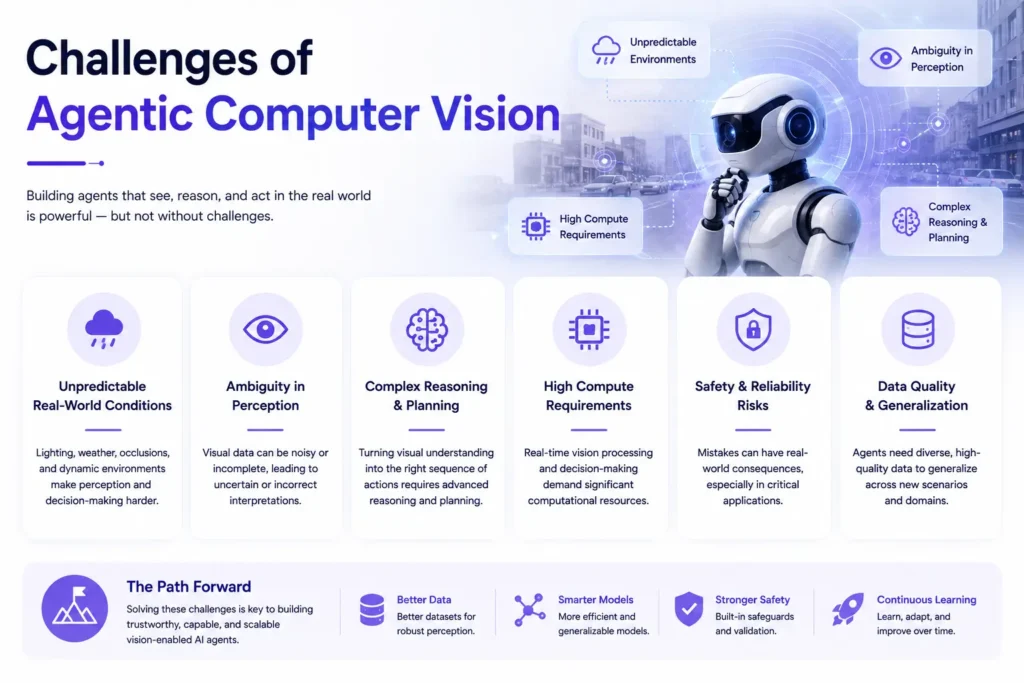
Agentic computer vision is promising, but it is not yet perfect.
The biggest challenge is reliability. An agent that misunderstands a screenshot or clicks the wrong button can produce an incorrect outcome.
Other challenges include:
- Visual hallucinations and incorrect scene interpretation
- Latency, particularly on edge devices
- Safety when agents control physical systems
- Limited standardised benchmarks
- Difficulty measuring performance across different environments
- Trust, monitoring, and human oversight
The source outline specifically contrasts the cited web-task success rates of Claude Computer Use and ChatGPT agent mode, demonstrating that even advanced systems can still fail on real-world tasks.
For high-risk applications, autonomous action therefore needs safeguards, verification, and appropriate human supervision.
What Comes Next for Visual AI Agents?
The next stage of agentic computer vision is likely to involve increasingly capable systems that understand not only what is visible, but also how environments behave.
The source outline points toward world models, autonomous AI workers, multi-agent visual systems, and on-device VLA models as important future directions.
The long-term vision is straightforward:
AI that can see, reason, act, learn from the result, and adapt.
Instead of AI being confined to a chat window, visual agents could operate across computers, robots, vehicles, drones, and other environments.
Frequently Asked Questions
1. What is agentic computer vision?
Agentic computer vision combines computer vision with AI agents so systems can perceive an environment, reason about what they see, take actions, and verify the results. Unlike traditional computer vision, which often performs a single analysis, an agent continuously observes and acts toward a goal.
2. How do AI agents use vision to navigate?
AI agents capture visual information through screenshots, cameras, or sensors. A vision model interprets the environment, a reasoning system determines the next step, and an action system executes it. The agent then observes the result and repeats the process.
3. What is a Vision-Language-Action model?
A Vision-Language-Action (VLA) model combines visual understanding, language instructions, and action generation. Instead of only describing an image, a VLA can connect what it sees and what it is asked to do with physical or digital actions.
4. What is the difference between a VLM and a visual agent?
A VLM primarily interprets visual information and produces an answer or description. A visual agent uses visual understanding as part of a larger perception-reasoning-action loop, allowing it to perform actions and adapt based on what happens next.
5. Can AI agents see and control computer screens?
Yes. Screen agents use screenshots or other visual representations of interfaces to identify buttons, forms, menus, and other elements. They can then perform actions such as clicking, typing, scrolling, and navigating between screens.
6. What is embodied AI?
Embodied AI refers to AI systems that operate through a physical body or environment, such as robots. Instead of only processing information digitally, the AI perceives the physical world and uses actions to interact with it.
7. What are the best computer-use AI agents in 2026?
The source outline highlights Claude Computer Use, ChatGPT agent mode, Google Project Mariner, Manus Desktop, and OpenVLA among notable systems. Their capabilities, availability, benchmarks, and suitability vary by task, so the best choice depends on whether the requirement is browser automation, desktop control, research, or robotics.